

Z1 Max TV Box Android 15 IPTV Allwinner H618 Quad Core 4G 5G Dual WiFi HD 8K 4K
SPECIFICATIONS
Audio: Dolby atmos
Audio Output: Audio line out
Auto Frame Rate: Yes
Bluetooth: Yes
Brand Name: CLIBABIQBOX
CLIBABIQBOX Model: z1
CPU: Allwinner H313,Allwinner H618
Category: Set Top Box
Certification: CE
DVB-T2 tuner: no
Enclosure material: Plastic
Ethernet: 100M
GOOGLE Cast: Yes
GPU: Mail-G31 MP2
HDR Standards: HDR10+,HDR10
High-concerned chemical: None
IPTV: Yes
Inbox adaptor: Yes
Internal Storage: 16GB eMMC,64GB eMMC,128GB eMMC
Max Output: 8K @ 60 Hz
Max. Extended Capacity: TF Card Up To 64GB
Memory: 2 G DDR3,4 G DDR3,8 G DDR3
OS: Android
OTA Update: Yes
Origin: Mainland China
Output Type: Colored
Power (W): DC 5V,2A
Power Source: AC&DC,AC&DC
Remote Control: Included
Remote controller included: Yes
Supported Internet Services: Other
System Upgrade: Yes
USB Ports: 2x USB 2.0
Video Code: H.264/AVC,H.265/HEVC
Video Output: HDMI-Compatible 2.0
Voice assistant built-in: Yes
Voltage range: Low voltage non-USB (below 75V DC, below 50V AC)
Weight: 402g
Wi-Fi Transmission Standard: 802.11n 2.4GHz/5 GHz
Wireless: Yes
Welcome
Friends,welcome to our Q96OHP Store. This store provides a 12 month guarantee. All of our products have undergone rigorous testing. Don't forget to subscribe to us! If you have any questions, please contact us. After placing an order, we usually ship within 24 hours
Possible issues and solutions
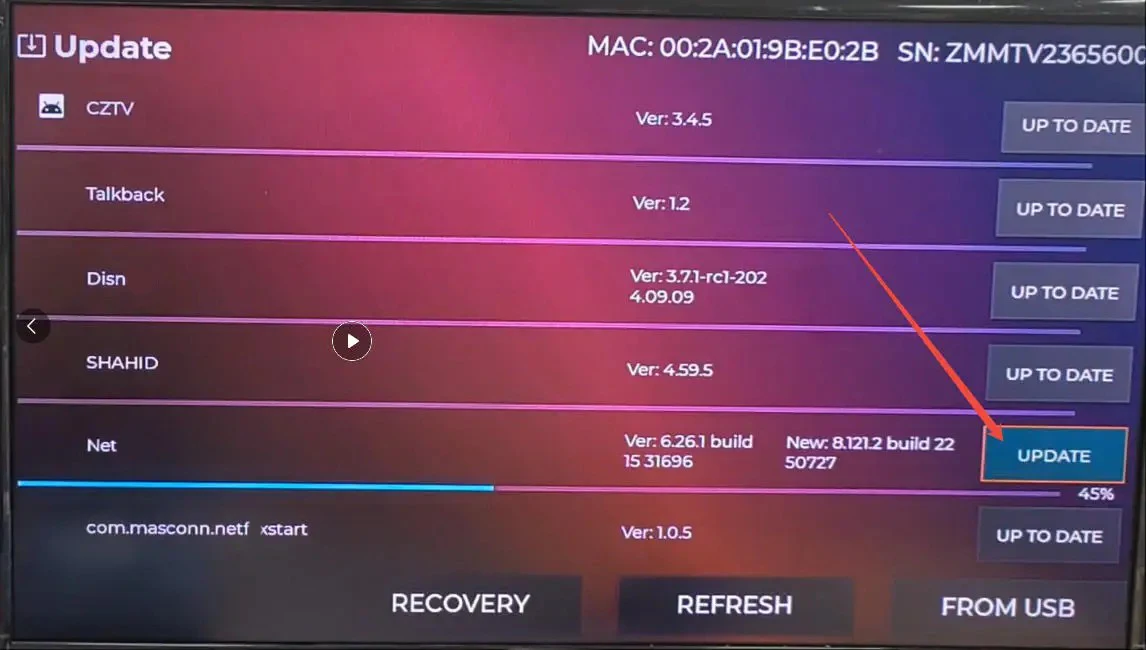
1. The z1 max remote control supports infrared and Bluetooth. If the device is paired with the remote control and the first pairing is unsuccessful for a long time, please restart the device and pair again 2.If the response is slow when using the remote control, it may be due to Bluetooth link failure or other reasons causing disconnection. Therefore, you need to reconnect the remote control in Bluetooth settings, which can be operated through the remote control's infrared function (insensitive and slow response) or by inserting a wired mouse into the TV box device. 3. The device is equipped with IPTV parsing software (cztv), which can be used as needed, but we do not provide IPTV services 4.If the device root interface appears and prompts try again, factory reset when starting, please connect the keyboard through the USB port, select factory reset through the directional keys, and press the enter key on the keyboard to confirm (in this mode, the system may only recognize the enter key on the keyboard for confirmation, so it cannot be operated through other external devices) 5. Currently, the device system functions have been upgraded to support automatic system updates and software updates (which can also be manually updated and downloaded through TV Manager). If the device does not have this software, please perform a manual system upgrade in XuPDATE. The solution is shown in the following figure Fix Net(flix) playback usage issues.
Mainly for the 3 steps of the image, please wait a moment and restart to use it normally
Open this app first
Click to update this
When the device is turned on and connected to the internet, it usually silently upgrades in the background.
If an immediate update is needed, the operation shown in the above image is required
If you have watched this, please read the following information carefully
Based on the user experience feedback we have collected, we have optimized and upgraded the system. This upgrade is non essential and users can choose not to upgrade, but it will bring these changes:1. XUpadte has been renamed as TV Manager. While retaining the original update software functionality, we have merged the app store into it, where we can download software that is compatible with our devices2. Optimized the system display interface to make it more aesthetically pleasing3. Add the function of silently pushing APK updates in the background (such as updating Netflix APK without th